Brand your own QR codes – now through MyGS1
You can now create your own QR Codes in MyGS1 using your brand’s or company web domain!
If you want to create a digital link to information about your product scannable with a smartphone, you no longer need to create generic QR Codes on your product packaging – you can now implement QR Codes powered by GS1 which your customers can scan and which crucially go “beep” at your customers retail point-of-sale.
The great news is you can do this through MyGS1 the member portal you have access to as a GS1 New Zealand member. Members who have access to the new, improved MyGS1 platform can create and download QR Codes powered by GS1 for use on retail products alongside traditional linear barcodes.
Using your web domain for QR Codes powered by GS1
We’ve launched recent updates in MyGS1 for QR Code graphic downloads. If you are familiar with MyGS1 you may notice some changes to the user interface and functionality around barcode graphic downloads next time you log in. These changes mean that you can now create QR Codes powered by GS1 using your brand’s web domain, rather than using the generic domain from GS1. This gives you the ability to create a seamless brand experience showcasing your brand in the QR code link contained within your QR Code powered by GS1.
 QR Codes powered by GS1 are different to generic QR Codes
QR Codes powered by GS1 are different to normal QR Codes as they can both ‘beep’ at point of sale and be ‘scanned’ by consumers with their smartphones. These next generation barcodes can help you connect with customers like never before.
QR Codes powered by GS1 | Normal QR Codes | |
|---|---|---|
Scannable at retail point-of-sale | ✅ | ❌ |
Scannable by a mobile phone | ✅ | ✅ |
Contains the GTIN (unique barcode number) | ✅ | ❌ |
Standards-based to ensure global interoperability | ✅ | ❌ |
Links can be kept up to date in MyGS1 | ✅ | ❌ |
Members are moving to QR Codes powered by GS1
Since QR Codes powered by GS1 went live in MyGS1 three months ago there has been a steady stream of GS1 New Zealand members using these Next Generation Barcodes for their products. Here’s what members are saying about using QR Codes powered by GS1:
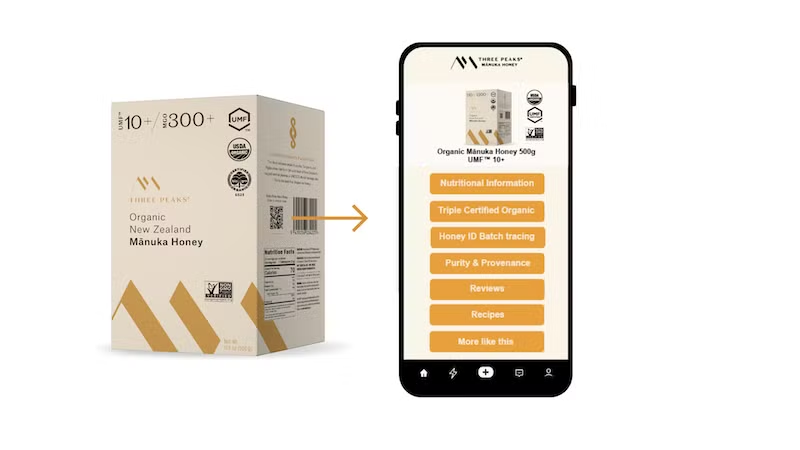
Steven Irvine, the first MyGS1 user to download a QR Code powered by GS1 says: “QR codes are the future. Don't be afraid if you've not used a QR code before, especially in the GS1 system, it's as easy as printing a linear barcode. You just select the QR code option.” Sean Goodwin, CEO of The Mānuka Collective says: “QR Codes powered by GS1 have enabled us to share our story and our commitment to transparency, provenance, and verified Mānuka honey authenticity directly from the pack.”
 Want to learn more about QR Codes powered by GS1?
Enjoy exploring QR Codes powered by GS1 – and know that we are here to support you! The GS1 NZ team is only a phone call or chat away from supporting you to make the most of QR Codes powered by GS1. Reach out to our team if you have any questions.
This article featured in: